

Description
Web-Integrated AT&T UC Central Communication
Overview
The AT&T UC Central Add-on by Correnet bridges the gap between web browsing and enterprise communication by integrating the functionality of the AT&T UC Central Client directly into the browser. Designed for professionals who frequently interact with contact information online, this tool streamlines communication by enabling one-click calling, instant messaging, and web meeting initiation from any webpage. It eliminates the need to manually copy and paste phone numbers or switch between applications, significantly reducing workflow interruptions.
The add-on is particularly useful in environments where employees regularly access customer data, vendor portals, or public websites containing contact details. By automatically detecting phone numbers and emails, it allows users to initiate calls or messages instantly. This is especially beneficial for customer support teams, sales representatives, and administrative staff who rely on rapid communication. The solution is not intended for general consumers but is tailored for enterprise users with access to AT&T Unified Communications services.
Correnet, the developer, positions this add-on as a productivity enhancer for organizations already invested in AT&T UC Central. It does not function independently and requires both a valid AT&T UC Central account and the PC client to be installed prior to use. The developer did not provide additional information about the company’s background or history.
Key Features & Capabilities
- One-Click Calling – Automatically detects USA and international phone numbers on web pages and enables immediate calling through the AT&T UC Central Client with a single click.
- Instant Messaging Integration – Allows users to send instant messages directly from the browser by selecting a contact from the detection menu.
- Web Meeting Initiation – Enables users to start web conferences from any webpage, reducing the time needed to launch meetings from external platforms.
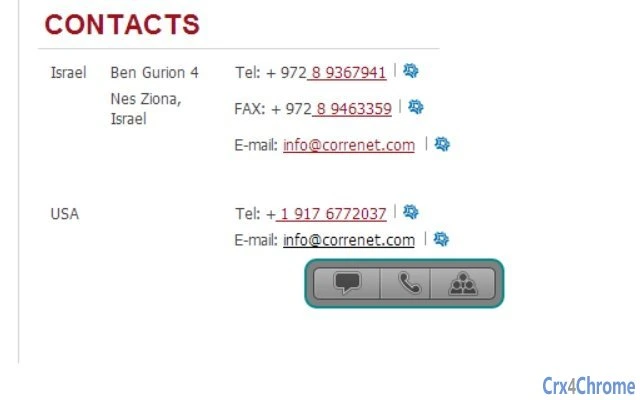
- Smart Number Detection – Recognizes standard phone number formats, including international numbers and email addresses, and marks them with a small icon for quick access.
- Customizable Settings – Advanced users can configure detection rules, limit scanning to specific websites, and adjust detection sensitivity for non-standard number formats.
These features are designed to reduce manual effort in communication workflows. For example, a sales representative reviewing a supplier’s website can instantly call a contact number without leaving the page. Similarly, a support agent can initiate a web meeting with a client directly from a ticketing system’s web interface. The add-on enhances productivity by minimizing context switching and improving response times.
User Interface, Workflow & Performance
The user interface is minimal and unobtrusive, designed to integrate seamlessly with the browser environment. Detected phone numbers are underlined and accompanied by a small icon that appears on hover. This icon provides access to a context menu with options for calling, messaging, or starting a web meeting. The design prioritizes clarity and speed, ensuring users can act quickly without visual clutter.
Navigating the add-on’s features is intuitive, requiring no training. After installation, users can begin using it immediately. The workflow is streamlined: detect a number → hover → select action → initiate communication. This reduces the number of steps required to contact someone online.
The developer did not specify resource usage details. Performance observations are based on general software behavior patterns. The add-on is lightweight, with a file size of 1.5 MB, suggesting low memory and CPU impact. Stability is expected to be consistent, as it relies on the existing AT&T UC Central Client for core functionality. No reports of crashes or conflicts were mentioned.
Compatibility & System Requirements
The AT&T UC Central Add-on is compatible with Windows and Mac operating systems. It is designed to work with modern web browsers that support extensions, though specific browser versions were not listed. The installation size is 1.5 MB, indicating a compact footprint.
Exact system requirements were not listed. The add-on requires the AT&T UC Central PC Client to be installed and active on the system prior to use. It also depends on a stable connection to AT&T Unified Communications Services. Without these prerequisites, the add-on will not function. Compatibility information is limited to the operating systems and the dependency on the client software.
Pros and Cons
Pros
- Seamless integration with AT&T UC Central Client
- One-click initiation of calls, messages, and web meetings
- Automatic detection of phone numbers and emails on web pages
- Lightweight design with minimal system impact
- Customizable settings for advanced users
Cons
- Requires AT&T UC Central PC Client and active service account
- Dependent on internet connectivity to AT&T Unified Communications Services
- Not available for general users or standalone use
- Limited to users within organizations that provide AT&T UC access
- Does not support mobile browsers or platforms
FAQ Section
Does this add-on work on mobile browsers?
The add-on is designed for desktop environments and does not support mobile browsers. It requires the AT&T UC Central PC Client, which is not available on mobile platforms.
Is the add-on free to use?
Yes, the add-on is available at no cost. However, access to its full functionality depends on having a valid AT&T UC Central account and the PC client installed.
Do I need to install anything else besides the add-on?
Yes, the AT&T UC Central PC Client must be installed and running on your computer before the add-on can function. The add-on does not include the client software.
Can I use this add-on without an internet connection?
No, the add-on requires a stable connection to AT&T Unified Communications Services. Without connectivity, it cannot initiate calls, messages, or web meetings.
Is the add-on secure?
The add-on operates within the security framework of the AT&T UC Central ecosystem. It does not store personal data locally and relies on the existing enterprise security protocols of the service.
Final Thoughts
The AT&T UC Central Add-on by Correnet delivers a focused, efficient solution for enterprise users already embedded in the AT&T Unified Communications ecosystem. By bringing core communication tools directly into the browser, it eliminates friction in daily workflows and enhances responsiveness. Its lightweight design, intuitive interface, and smart detection features make it a valuable tool for professionals who rely on quick, seamless communication.
While its utility is limited to organizations with AT&T UC Central access, those users will find it a powerful productivity booster. The lack of standalone functionality is not a flaw but a design choice aligned with its enterprise-focused purpose. For eligible users, this add-on is a practical enhancement to existing communication infrastructure.
Download AT&T UC Central Add-on now
Guides & Tutorials for AT&T UC Central Add-On Extension for Chrome
How to install AT&T UC Central Add-On Extension for Chrome
- Click the Preview / Download button above.
- Once redirected, accept the terms and click Install.
- Wait for the AT&T UC Central Add-On Extension for Chrome download to finish on your device.
How to use AT&T UC Central Add-On Extension for Chrome
This software is primarily used for its core features described above. Open the app after installation to explore its capabilities.
User Reviews for AT&T UC Central Add-On Extension for Chrome 0
No reviews found





